Apple Watch recording not showing on your iPhone
Your recording is safe on the watch until it transfers: the audio is deleted only after your iPhone confirms the note is saved. Nothing is lost by a transfer that has not happened.
Start here: the recording is still on your watch. Limemo writes the recording down before the first byte leaves, and it deletes the audio from the watch only after your iPhone confirms the note is saved. Every other outcome leaves the file where it is, ready to send again.
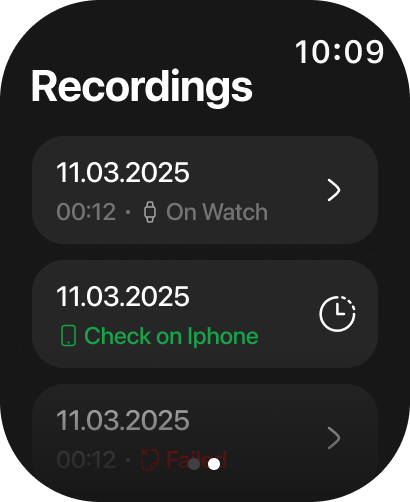
- Open Limemo on the watch and swipe to Recordings. Each row shows its own status.
- Read the status on the row that is missing from your phone:
- On Watch — it has not been sent yet, and it will not send itself. Tap the row and choose Resend.
- A percentage — it is transferring right now. Keep the two devices near each other and let it finish; a row that is transferring cannot be tapped.
- Check on Iphone — the watch has finished sending. Open Limemo on the phone, which is what tapping the row tells you to do too.
- Failed — the transfer stopped. Tap the row and choose Resend. It sends the same file again; nothing is re-recorded.
- Bring your iPhone close to the watch and unlock it.
- Open Limemo on the iPhone and leave it open for a moment. The note list refreshes on its own when a recording arrives.
- Only one recording transfers at a time. If another is still going, Resend answers Wait for the current transfer to finish — let that one land, then send this one.
If that didn’t work
- You just reopened Limemo on the watch. A transfer cannot survive the app closing, so anything that was still transferring, or still waiting on the phone, is marked Failed on the next launch — deliberately, because Failed is the status you can resend.
- A row has said Check on Iphone for several minutes. While the Recordings page is open, Limemo re-marks anything unacknowledged for five minutes as Failed — which turns it into a row you can resend.
- The watch app is not the current version. Update Limemo on the iPhone; the watch app follows from there.
- Still nothing. Write to us and include your watch model, the watchOS version, the iOS version and what the row’s status says. Those four narrow it immediately.
Is the recording lost?
No. The audio stays on the watch until your iPhone acknowledges that the note is saved — that is the rule the app is built on, not something it merely tries for. What that means in practice: a recording you can still see on the watch is a recording you can still get, and deleting the row — which also deletes its audio — is the only thing that removes it. Where your recordings are stored covers what happens after that.
Still need help?
Write to us and we will take it from there. Contact · support@orvanta.limited