How to transcribe a voice memo on iPhone
Tested on Limemo 1.0.0, iOS 26, iPhone 16 Pro · · Published  By · Product and support team
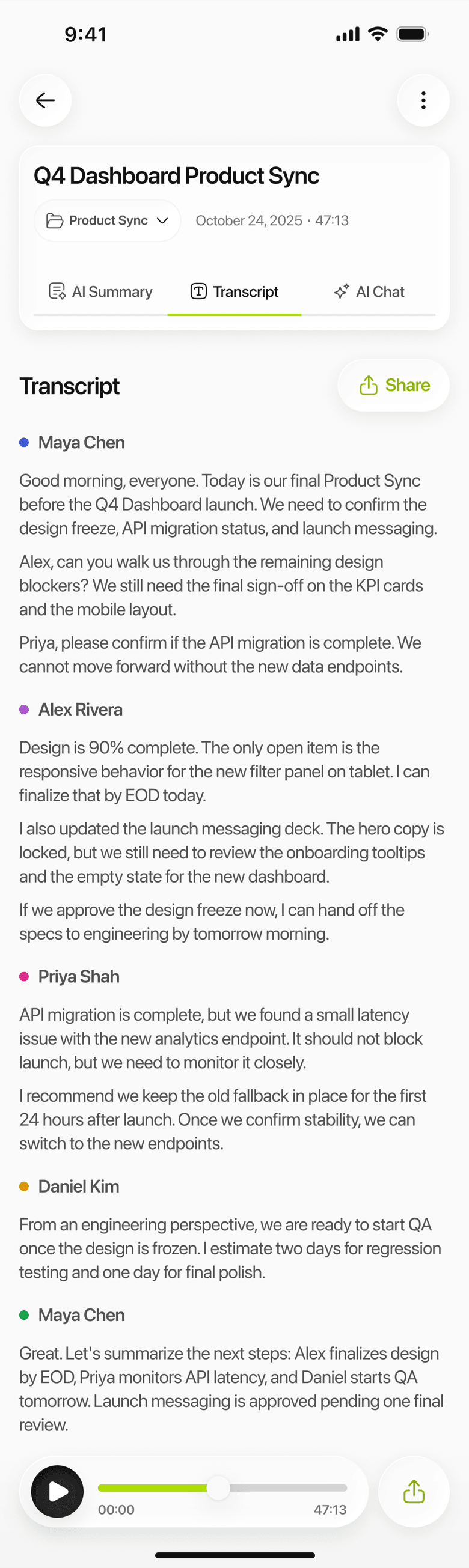
Two routes, and the right one depends on whether the memo already exists. If it does, save it out and import it, and it comes back with the voices separated and a summary in the format you pick. If it does not, recording it in Limemo, where the transcript is waiting when you stop, saves the round trip entirely.
Most people land here from one specific job: turning an iPhone voice memo into text.
What a plain transcript leaves you with
A voice memo on its own is audio, and a plain transcript of one is a single stream of text.
That matters more than it sounds for anything that is not you talking alone. A conversation arrives undifferentiated, so you read it twice: once for the words and once to work out who said what. There is no summary, so a forty-minute memo is still forty minutes of reading. And the text stays where it was made, which is not where you keep anything else.
Method 1: import the memo into Limemo for speaker labels and a summary
- In Voice Memos, open the recording, tap the share button and choose Save to Files. Limemo never reads another app’s library, so the memo moves because you moved it.
- In Limemo, start a new note from an audio file and pick that recording.
- Wait for the transcript. It comes back with speaker labels, so a two-person conversation does not read as one block.
- Choose a summary format — Memo or Standard suits a voice memo — and, if you want it in another language, translate the summary.
The original audio stays with the note, so you can still listen back, and you can export the transcript as TXT or PDF or share the audio itself. The import does not care how old the recording is, what language it is in, or which iPhone made it.
An imported memo is treated like every other Limemo note: encrypted in transit and at rest, and deletable at any time.
Method 2: record the next one on your Apple Watch
- Tap the Limemo watch widget and the recording starts on the spot — or open the app on the watch and press record.
- Say the thing.
- Stop. The recording transfers to the Limemo app on your paired iPhone the next time the two are connected.
- Open the note on your iPhone: transcript, speaker labels and summary, same as a phone recording.
This is the route for ideas caught while walking, when getting the phone out is the reason the idea gets lost.
Which route fits your memo
The two ways differ in what you get back, not in how hard they are.
- Take method 1 when the memo already exists and the transcript is not the finished job: a two-person conversation you need split by speaker, a twenty-minute ramble you need summarized, or anything you are going to send to somebody else.
- Take method 2 when the memo you are thinking about has not been recorded yet. Anything you record in Limemo — on the phone or from your wrist — arrives already transcribed, and the save-and-import step never happens.
Frequently asked questions
Can I transcribe voice memos recorded years ago?
Yes. Age does not matter — the import takes any audio file you can reach in Files.
Does transcribing delete the original audio?
No. Both routes leave the recording where it is. In Limemo the audio stays attached to the note, so you can play it back or export it later.
Can I transcribe a voice memo in another language?
Limemo works with 99+ languages and can translate the summary into a different one.
How do I get speaker names into the transcript?
Limemo labels speakers automatically and lets you rename them in the note, so 'Speaker 1' becomes the person who was actually talking.